Vue完整指南
Udemy - Vue: The Complete Guide
This course was created by Maximilian Schwarzmüller
Vue.js is an awesome JavaScript Framework for building Frontend Applications! VueJS mixes the Best of Angular + React!
What I have learned?
- Build amazing Vue.js Applications - all the Way from Small and Simple Ones up to Large Enterprise-level Ones
- Understand the Theory behind Vue.js and use it in Real Projects
- Leverage Vue.js in both Multi- and Single-Page-Applications (MPAs and SPAs)
- Learn the latest version of Vue (Vue 3), including the brand-new Composition API
Core features
Create a Vue app
- Vue.createApp() → Global
- Has an object to configure Vue:
- data → It is a function, everything returned by the data function can be used in the HTML controlled by Vue. Vue takes all the data in this object and merges it into a global instance Vue object, to access this global instance we need to use the keyword
this. - methods → Allow you to define functions, it takes an object that holds as many functions as you may need.
- data → It is a function, everything returned by the data function can be used in the HTML controlled by Vue. Vue takes all the data in this object and merges it into a global instance Vue object, to access this global instance we need to use the keyword
1 | const app = Vue.createApp({ |
Mount Vue app
- We control all child elements of the HTML element mounted by Vue.
1 | app.mount("#element-id"); |
Basic directives
v-model
A two-way binding (listening and writing through value attribute), makes Vue manage the property. A shortcut for a v-bind:value and v-on:input.
v-on
Add an event listener: <button v-on:click="addGoal">Add Goal</button>
This directive has a shorter version: @click
v-for
Loop thought the content of an array, creating an element for each one.
1 | <ul> |
v-bind
Set a value to an attribute: <input type="text" v-bind:value="myName" />
This directive has a shorter version: :value
v-html
Insert HTML content, but has security issues:
1 | <p v-html="myName"></p> |
v-once
Any dynamic data binding, like interpolations, should only be evaluated once.
Event modifier
Modify a default event behaviour.
.prevent → Prevent a form submission
1 | <form v-on:submit.prevent="submitForm"> |
.stop → Stop the event from happening, in this example without the .stop modifier will be impossible to type in the input without triggering the removeGoal function.
1 | <ul> |
Inserting dynamic content
- To insert text content on the page we use the interpolation method by adding
{{ variable/expression }} - The interpolation only allows us to use simple JavaScript expressions or pure text, and always between HTML tags.
1 | <section id="assignment"> |
Calling a function
We can call a function using v-bind or v-html but these methods are not the best way for outputting some dynamically calculated values.
We can also call a function like this: {{ functionX() }}, but this way Vue will automatically rerun this function on every change because it doesn`t know what this function does.
Methods
Use with event binding OR data binding.
1 | const app = Vue.createApp({ |
Data binding {{ }} methods are executed for every “re-render” cycle of the component. Use for events or data that really needs to be re-evaluated all the time.
Computer properties
Used only with data binding, not with events. They are essentially like methods but Vue is aware of their dependencies and only re-execute them if one of the dependencies changed. Use for data that depends on other data.
1 | const app = Vue.createApp({ |
Used as a data property not like a function: <p>Your Name: {{ fullname }}</p>.
From the performance perspective using computed properties is better than methods for outputting values in most cases but events cannot be bound to computed properties.
Watchers
Not used directly in template. A function that executes some logic when a bound property changes. Ideal to change a data property when something happens. Use for any non-data update you want to make.
1 | const app = Vue.createApp({ |
Allows you to run any code in reaction to some changed data. Could be used with HTTP requests or timers.
Dynamic styling
Vue supports a dynamic class :class that can be applied when a data property is true.
1 | <section id="styling"> |
1 | data() { |
A better approach for complexes use cases could be to use computed properties to keep the logic separated from the HTML.
1 | <section id="styling"> |
1 | computed: { |
It`s also possible to use an array as classes, this could allow more dynamic changes in styling.
Conditional content rendering
Directive v-if
Add a condition to render the element the expression must return true or false.
1 | <p v-if="goals.length === 0"> |
Directive v-else and v-else-if
They must be used on the element that is directly after the element with v-if on it.
1 | <p v-if="goals.length === 0">...</p> |
The elements impacted by the v-if directive are removed from the DOM.
Directive v-show
The v-show directive works similarly to v-if but it doesnt remove the element, it just change the display style to none: display: none`.
1 | <p v-show="goals.length === 0">...</p> |
Normally used on elements that changes visibility a lot.
Render lists of data
Directive v-for
Like a normal for in JavaScript, we can use for to loop through an array of content or an object.
1 | <ul v-else> |
It`s possible to get the index of the item in the array.
1 | <li v-for="(goal, index) in goals"> |
To remove an item from an array we can create a method that uses splice and pass the index of the item through a property of the function.
1 | <li v-for="(goal, index) in goals" @click="removeGoal(index)">{{ goal }}</li> |
1 | methods: { |
Key attribute
When using v-for it`s important to keep track of the elements because of the way Vue works internally, without this specific attribute Vue will not know which element is which and this could create unexpected behaviour.
1 | <li v-for="(goal, index) in goals" :key="goal">{{ goal }}</li> |
This key must be unique, the index of the array will not be a good idea because it changes every time we remove an item from the array, the index is not attached to the data. In this example, the goal is a better option.
Refs
Another way to bind properties to the HTML elements.
1 | <input type="text" ref="userText" /> |
1 | this.userInput = this.ref.userText.value; |
Vue behind the scenes
JavaScript is not reactive, Vue use Proxies from JavaScript to keep track of changes.
Vue keeps track of all your data properties and whenever such a property changes, it updates the part of your app where that property was used.
You can have more than one app but they will not communicate between themselves.
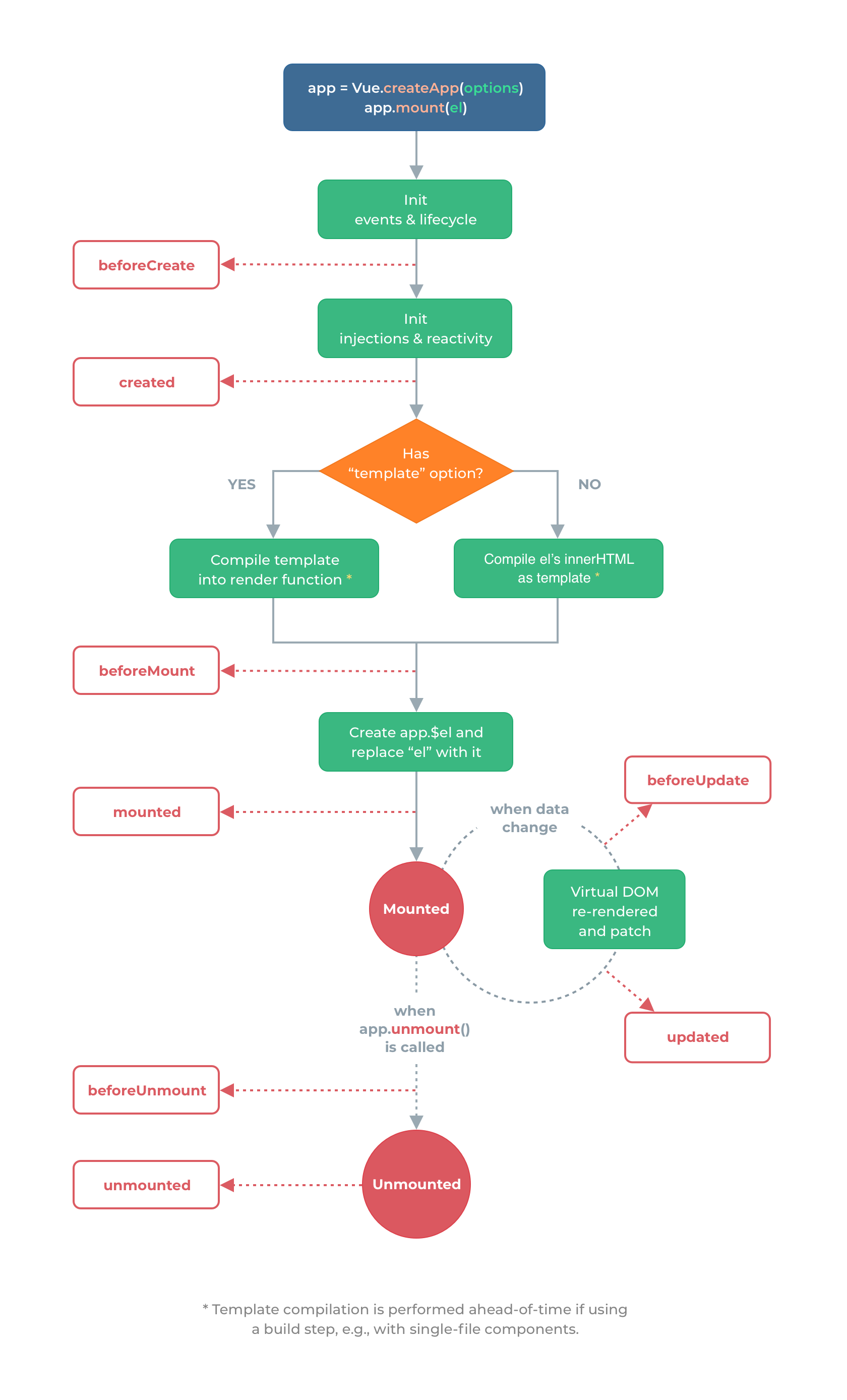
Vue instance lifecycle
Components
Components are reusable pieces of HTML with connected data and logic like an app inside an app, components are render elements directly from Vue. The v-for directive is used to output simple data not complex HTML elements with particular features.
Notes
- Vue uses a declarative approach instead of regular JavaScript which normally uses an imperative approach (step-by-step). We decide the end results, not how to get them.
- It is a good practice not to put too much logic on your HTML code, the HTML code should be about outputting stuff.
- We can use separate normal JavaScript
funcitonswhen dealing with variable that are not related to theVuelike auxiliar functions to obtain a random number.1
2
3function getRandomValue(min, max) {
return Math.floor(Math.random() * (max - min)) + min;
}